TinyCad

TinyCad is a schematic capture program that can output SPICE compatible netlists.  It has library capabilities built in.  

A quick summary of tools used to Build and Maintain TinyCAD

1.    Microsoft Visual Studio 2003, 2005, or 2008 Standard or Professional (Commercial tool $$$).  Initial reports from other programmers are that Microsoft Visual Studio 2010 works without issues,

2.    TortoiseSVN or other SVN client (OpenSource tool – free from http://tortoisesvn.net. 

3.    Doxygen (OpenSource documentation tool – free from http://www.doxygen.org).  Doxygen is used to generate special documentation for programmers to help them understand  large software projects.  TinyCAD was not originally written with Doxygen support, but I am working on adding it.

4.    Microsoft’s HTML Help Workshop.  This package has tools used to compile the TinyCAD Help files.  

5.    Nullsoft Scriptable Install System (NSIS) – Use version 2.40 or higher.  Older versions may not support the feature set that TinyCAD is using.  This very professional installer is Open Source and freely available from http://nsis.sourceforge.net.  Of course, it is possible to use any other installer program to construct your own installer for TinyCAD, but other tools are not supported by this developer at this time for lack of resources and time only.

6.    Microsoft Windows 7 Software Development Kit.  This is a free download from Microsoft.  

Note that after installing the Windows SDK, you must run a command from the SDK to update the paths for whichever version of Visual Studio that you are using (otherwise, it will continue to use the older include file path installed by your Visual Studio version).  On my particular copy of Windows XP SP3, I found this command using the sequence “Start Menu\Programs\Microsoft Windows SDK v7.1\Visual Studio Registration\Windows SDK Registration Tool”.  Select the highest available version in the dropdown version selector box.


Research Links

Open Source Software: Timing Editor

I needed to draw a timing diagram for a mixed signal class I took.  I found 

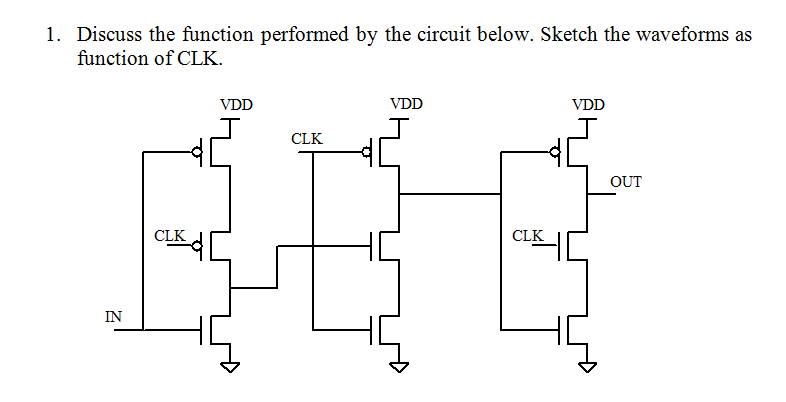
The problem I was solving is shown below in the image.  It's rather tedious to figure out.  You have to remember that once a gate capacitance is charged up it ideally holds that charge until it is connected to again by either Vdd or Ground.


The gate turns out to be a falling edge triggered flip flop.  You can see it in the wikipedia:flip flop article that includes this diagram which was found after I did the timing diagram.


Julius: two-pass large vocabulary continuous speech recognition (LVCSR) decoder software

Links

"Julius" is a high-performance, two-pass large vocabulary continuous speech recognition (LVCSR) decoder software for speech-related researchers and developers. Based on word N-gram and context-dependent HMM, it can perform almost real-time decoding on most current PCs in 60k word dictation task. Major search techniques are fully incorporated such as tree lexicon, N-gram factoring, cross-word context dependency handling, enveloped beam search, Gaussian pruning, Gaussian selection, etc. Besides search efficiency, it is also modularized carefully to be independent from model structures, and various HMM types are supported such as shared-state triphones and tied-mixture models, with any number of mixtures, states, or phones. Standard formats are adopted to cope with other free modeling toolkit such as HTK, CMU-Cam SLM toolkit, etc.

Originally done for Japanese.

Here you can get Japanese and English free language/acoustic models.

QUCSEdit stand alone compile errors

Appears to be 2 types of errors 

  • Errors due to class changes going from Qt3 to Qt4 – These could probably be addressed with correct switch to include q3support library that is included with Qt4.  I copied the q3textstream.h to the working directory to get around referencing error.  By not setting this I am forcing all the references not compatible with Qt4 to surface.
  • Errors due to the translation files not being available for access


freemonsandlewould@desi:~/Documents/qucs-edit$ make
g++ -c -pipe -O2 -Wall -W -D_REENTRANT -DQT_NO_DEBUG -DQT_GUI_LIB -DQT_CORE_LIB -DQT_SHARED -I/usr/share/qt4/mkspecs/linux-g++ -I. -I/usr/include/qt4/QtCore -I/usr/include/qt4/QtGui -I/usr/include/qt4 -I. -I. -o main.o main.cpp
main.cpp: In function ‘bool loadSettings()’:
main.cpp:44:14: error: ‘homeDirPath’ is not a member of ‘QDir’
main.cpp:64:8: error: ‘class QFile’ has no member named ‘setName’
main.cpp:64:16: error: ‘homeDirPath’ is not a member of ‘QDir’
main.cpp:73:36: error: ‘class QString’ has no member named ‘stripWhiteSpace’
main.cpp: In function ‘bool saveApplSettings(QucsEdit*)’:
main.cpp:95:14: error: ‘homeDirPath’ is not a member of ‘QDir’
main.cpp:105:43: error: expected ‘;’ before ‘PACKAGE_VERSION’
main.cpp: In function ‘void showOptions()’:
main.cpp:116:55: error: ‘PACKAGE_VERSION’ was not declared in this scope
main.cpp: In function ‘int main(int, char**)’:
main.cpp:150:30: error: ‘BITMAPDIR’ was not declared in this scope
main.cpp:151:28: error: ‘LANGUAGEDIR’ was not declared in this scope
main.cpp:162:12: error: ‘locale’ is not a member of ‘QTextCodec’
main.cpp:172:68: error: cannot convert ‘QString’ to ‘const char*’ for argument ‘2’ to ‘int fprintf(FILE*, const char*, …)’
main.cpp:176:22: error: ‘const class QChar’ has no member named ‘latin1’
main.cpp:182:67: error: cannot convert ‘QString’ to ‘const char*’ for argument ‘2’ to ‘int fprintf(FILE*, const char*, …)’
main.cpp:189:67: error: cannot convert ‘QString’ to ‘const char*’ for argument ‘2’ to ‘int fprintf(FILE*, const char*, …)’
main.cpp:196:5: error: ‘class QApplication’ has no member named ‘setMainWidget’
make: *** [main.o] Error 1

Migration Qt3 to Qt4: They changed the name of class members that APPEAR to do the same thing.  

Modified File: qucsedit

Auxiliary Links