Eagle PCB ULP Tutorial: User Language Program that lists the directory path of the Project File

When you need to know the path of the project you are running the ULP within the following code snippet is useful.


string get_project_path() {
  if (board)     board(B)     return(filedir(B.name));
  if (schematic) schematic(B) return(filedir(S.name));
  if (library)   library(B)   return(filedir(L.name));
}


string Directory;
Directory = get_project_path();
dlgMessageBox(Directory, "+Yes", "No","Maybe");   


Zuchini Onion Garlic Ginger Soup

Research Links

Ingredients

  • Olive Oil
  • 1 white onion, sliced
  • 8 to 9 large cloves garlic, sliced thinly 
  • 4 medium zucchini, about 1 1/2 pounds
  • 4 cups chicken or vegetable broth 
  • 1/2 teaspoon fresh ginger
  • Salt and pepper to taste

Put sliced garlic and onions and sautee in olive oil on medium-low heat for about 10 minutes, or until the onion is soft and translucent.

When the onions are soft, add the zucchini and cook until soft. Add the broth and bring to a simmer. Simmer at a 
low heat for about 45 minutes.

Let cool slightly, then blend with an immersion blender until creamy, or transfer to a standing blender to puree. 
Be very careful if you use the latter; only fill the blender half full with each batch, and hold the lid down tightly 
with a towel.

Taste and season with ginger, salt and pepper. Like most soups, this is significantly better after a night in the 
refrigerator to let the flavors meld.

Comments

  • This one is a real winner.  The ginger counterpoints against a very gentle sweetness from the zuchini 
  • In the original recipe they call for powdered ginger.  I think that would be a huge mistake.  The fresh ginger makes this recipe.

Tutorial: Eagle PCB ULP to write Script that Changes all the Devices in a library to have Value = ON

You select a device in an opened library for edit by using this syntax:  edit deviceset

Value is set to an active editable value with the syntax:  value on

Thus on a meta level this script is going to do the following things for each part in the library:

  • write the open device command to script file using syntax:  edit deviceset
  • write the turn the device value to script file using syntax: value on
  • repeat until all the parts in the library have been cycled through

This script will build upon the script that lists the devicesets in a library.


//—— Get the ULP Path ——//

string ULP_Path;
char bkslash = '/';
int pos = strrchr(argv[0], bkslash);

  if (pos >= 0) 
    { 
      ULP_Path = strsub(argv[0], 0, pos + 1);
    }

output(ULP_Path + "TurnValueOnAllParts.scr", "wt"){library(L) { L.devicesets(D) { printf("edit " +  D.name + ".dev" + "\n"); 
                                                                                  printf("value on \n");
                               
                               }}}


Note that the script cycles through devicesets and not devices. 

Using WinSmith Program to Design Matching Circuit of 900MHz ISM Band Power Amplifier

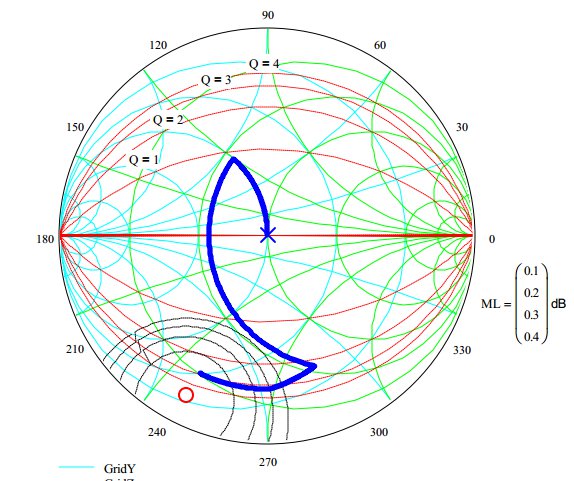
WinSmith is a Smith chart match calculating program.  The starting point is 8 – j16 ohms @ 915MHz.  Both the blue and the green curves start at this point at the lower left of the curves.  Click on the image to see a bigger version

DrainMatching_MW7IC915NT1_WS

What is interesting about the above plot is that the elements work orthogonally.  That is to say for any point selected by component of move #2 or move #3 work independently.  

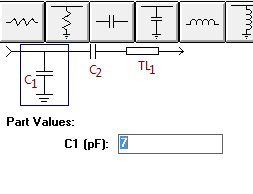
The matching circuit is shown below:

DrainMatchingCircuit    

Nominal values

  • TL1:  45 degrees of 50 Ohm transmission line @ 900MHz
  • C2:   25pF 
  • C1:   7pF

The left side is 50 Ohms match and the right side is what presents a conjugate match to the FET IC drain circuit.  Move #1 on the Smith chart is the 45 degrees of 50 Ohm characteristic impedance transmission line.

Tuning Procedure- theoretical

  • The output load of the FET MMIC amplifier will vary somewhat.  In spite of this the 45 degrees will transform the load to a region in the charge where the two caps can move the load to the close to the center of the chart.
  • C2 has one job only:  move the load to a 0.02 conductance circle on the Smith chart.  This is the conductance circle that corresponds to 50 Ohms in shunt.  Once you know the value of this capacitor you solder in place and leave it.
  • C1 is used in shunt to bring the whole thing to the center of the chart.  A calculated value can be used for a first try.  You may need to cut and try to get absolute optimum on your lab model.  

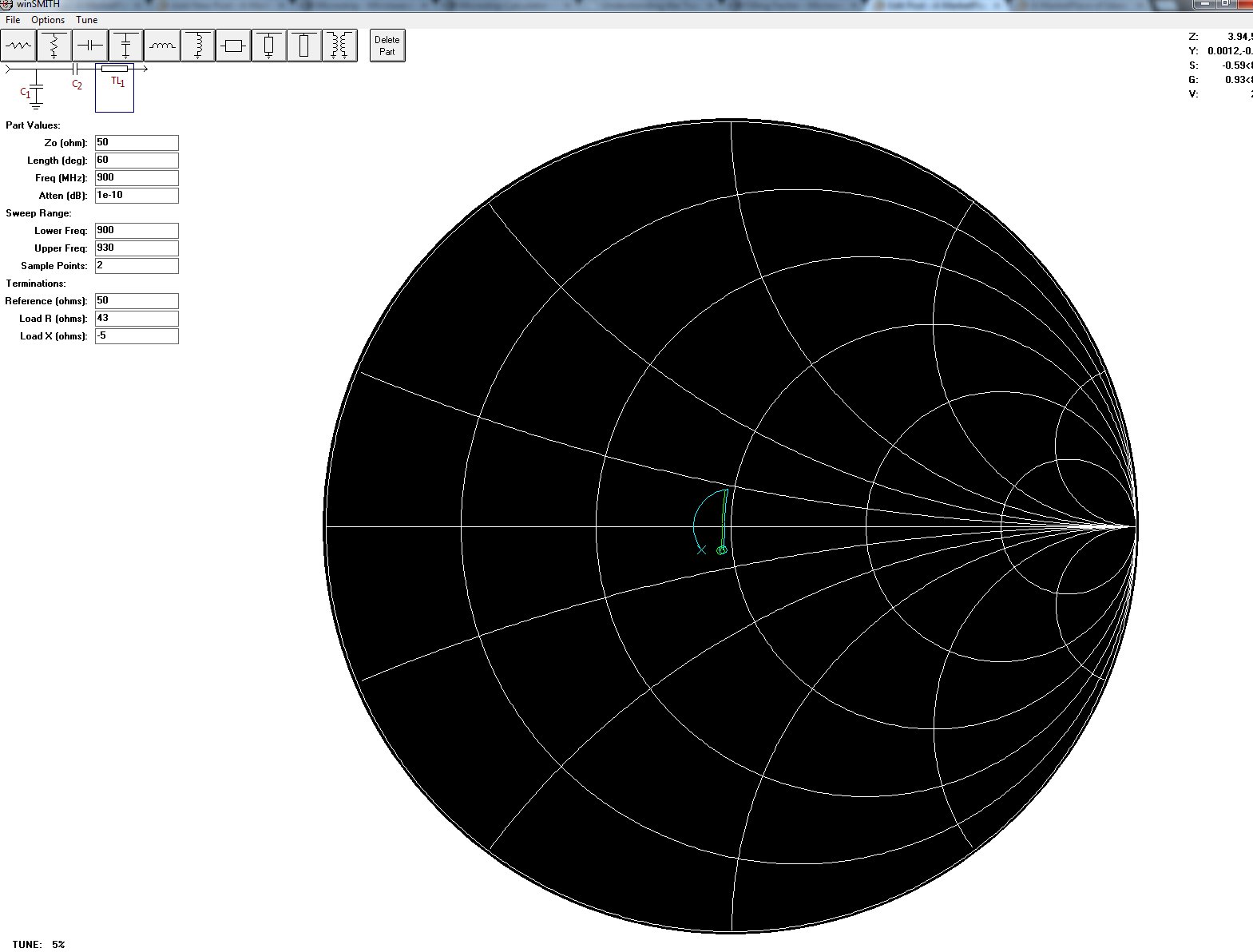
Input Match

The input match is the same topology.  It starts much closer to 50 Ohms.  The nominal values are

  • TL1: 60 degrees of 50 Ohm line at 900MHz
  • C2: 22pF 
  • C1: 0.5pF – This is placeholder in case of surprises.  The match looks accomplished without it.

MW7IC_InputMatch

Links