Gabor Szabo Presentation – Open Source Contribution with Focus on PERL and GetHub Use:1-24-2026

Links

From GS Email – 1/25/2026 – Post Presention Summary

In the first hour I showed some PRs I prepared for MIME::Lite you can watch the video here.

In the second hour we had two pair-programming sessions. In each one a participant was writing the code and I was giving the instructions. Driver-navigator style. Others added valuable comments. This part was also recorded and you can watch it here.

Please follow that channel and "like" the videos. That will help spreading them a bit further.

I've schedule a new event. You can register here.

I also mentioned that in order to make these events sustainable I am looking for corporate sponsors. If you work at a company that uses Perl a lot and you think these sessions are valuable, let's work out a way for them to sponsor the events.

Sponsors will be mentioned on the OSDC web site and in the Perl Weekly. They will also be able to give a list of modules important for them and we'll try to work on those in our sessions.
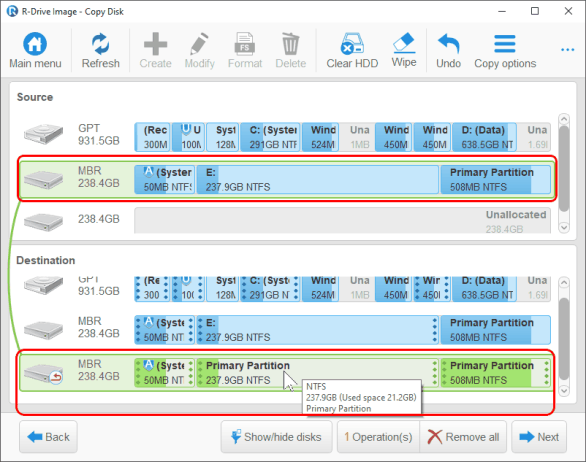

Ubuntu Linux How to Clone a Disk

Research Links

To clone a disk in Ubuntu, the most common methods involve booting from a Live USB and using tools like dd (block-level copy) for a direct clone or Clonezilla / Gnome Disks for a more user-friendly, partition-aware process, ensuring the target disk is equal or larger, and being extremely careful with device names (/dev/sda, /dev/sdb) to avoid data loss. 

Yes, you can easily clone from one external disk to another in Ubuntu using command-line tools like dd or rsync, or dedicated graphical tools like Clonezilla, ensuring you identify source/target drives correctly to avoid data loss, often by booting from a Live USB for system drives. Always double-check drive identifiers and consider post-clone steps like updating UUIDs if you plan to use both drives simultaneously or move the cloned drive to a new system. 

Local Artificial Intelligence AI Search On a Website

Research Links


Here is the step-by-step process for the easiest local setup:

1. Set Up Your Local Environment

  • Install Local (formerly Local by Flywheel): Download and install Local. This software allows you to run a WordPress site on your laptop without any web connection.
  • Import Your Site: Drag and drop your WordPress backup file (.zip from Duplicator, All-in-One Migration, or WP Vivid) onto the Local app to create an offline, local copy. 

2. Implement Local Vector Search

Install a Semantic Search Plugin: Inside your local WordPress dashboard, install a plugin that supports vector embeddings.

  • AI Vector Search (Recommended for Easiest): This plugin allows you to run search locally out of the box ("Lite Mode").
  • WPSOLR: Good for indexing content locally using Docker containers.
  • Vectorize Content: Go to the plugin’s settings and click "Index" or "Re-index." The plugin will convert your post content into vectors (embeddings) and store them in your local MySQL database. 

3. (Optional) Enhance with Local LLM (True Local AI)

To make it "totally local" (meaning no OpenAI API), you can connect the plugin to a local model runner:

  • Ollama: Install Ollama on your machine to run open-source models like Llama 3 or Mistral locally.
  • Connect Vector Search: Configure the AI Vector Search plugin to use Ollama for generating embeddings instead of an API. 

Summary of Tools

  • Environment: Local (LocalWP).
  • Plugin: AI Vector Search (Semantic).
  • Search Engine: Local MySQL or Dockerized Weaviate/Solr. 

This setup ensures that all your data stays on your machine, no external API calls are made, and your search functionality remains active without internet access. 

Dell T3610 nVidia Driver Issue

Research Links GAI: When I install ubuntu I get the following error messages. How to fix dpkg: dependency problems prevent configuration of nvidia-driver-470: nvidia-driver-470 depends on nvidia-dkms-470 (<= 470.256.02-1); however:Package nvidia-dkms-470 is not configured yet. nvidia-driver-470 depends on nvidia-dkms-470 (>= 470.256.02); Read more…

Speed of Light as a Fundamental Property of the Universe

This is an AI creation.  

  • I do not think it was written directly by Feynman – but it was clearly derived from his work because I recognize too much of its style and content from Feynman Lectures on Physics
  • Voice cloning is extremeldy well done

YT: Why Light Speed Is The LIMIT? What Feynman Uncovered Will Collapse Your Mind

From video notes:  Derived from

  • "Six Not-So-Easy Pieces" by Feynman — the relativity chapters are very good.
  • "The Feynman Lectures on Physics Vol. 1" — Chapters 7-9 (gravity), 15-17 (relativity)
  • "The Character of Physical Law" — Chapter 4 is a masterpiece