Standard Install Disk Partition of Ubuntu Linux of an Erase and Install Instance
- GAI: what does a standard install disk partition of ubuntu linux look on an erase and install instance?

When selecting the "Erase disk and install Ubuntu" option in the Ubuntu installer (a "clean install"), the installer automatically partitions the entire drive using the GPT (GUID Partition Table) scheme for modern UEFI systems. It typically creates two or three main partitions to manage boot files, the operating system, and memory.
Here is what a standard, modern (22.04/24.04) "Erase and Install" partition layout looks like:
Typical Modern Layout (UEFI)
/dev/sda1 (or nvme0n1p1): EFI System Partition (ESP)
- Size: ~512 MB to 1 GB
- Filesystem: FAT32
- Purpose: Contains the bootloader (GRUB) and EFI files.
/dev/sda2 (or nvme0n1p2): Root Partition (/)
- Size: Remaining space on the disk
- Filesystem: EXT4
- Purpose: Contains the OS, applications, and user files.
Swap:
-
Modern Behavior: Modern Ubuntu versions typically do not create a separate swap partition. Instead, they create a swap file (e.g.,
/swapfile) located inside the root (/) partition
Notes
- EFI = Extensible Firmware Interface
- UEFI = Unified Extensible Firmware Interface
An EFI partition (or EFI System Partition, ESP) is a small, FAT32-formatted partition on a hard drive or SSD required by UEFI-based computers to boot the operating system. It holds bootloaders, drivers, and system utilities. EFI stands for Extensible Firmware Interface, which is the predecessor to the modern Unified Extensible Firmware Interface (UEFI).
Key Details About Linux EFI Partitions:
- Purpose: The UEFI firmware reads this partition to find and load the bootloader (e.g., GRUB, systemd-boot) to start Linux.
- Size & Filesystem: It is typically 100MB to 500MB, formatted with FAT32.
-
Mount Point: In Linux, it is usually mounted at
/boot/efi. - Requirement: Mandatory for booting in native UEFI mode, not required for legacy BIOS/MBR.
- Multi-boot: A single EFI partition can store bootloaders for multiple operating systems, including Windows and various Linux distributions.
If you are using a GPT disk, the EFI partition is assigned a specific GUID to help the system identify it.
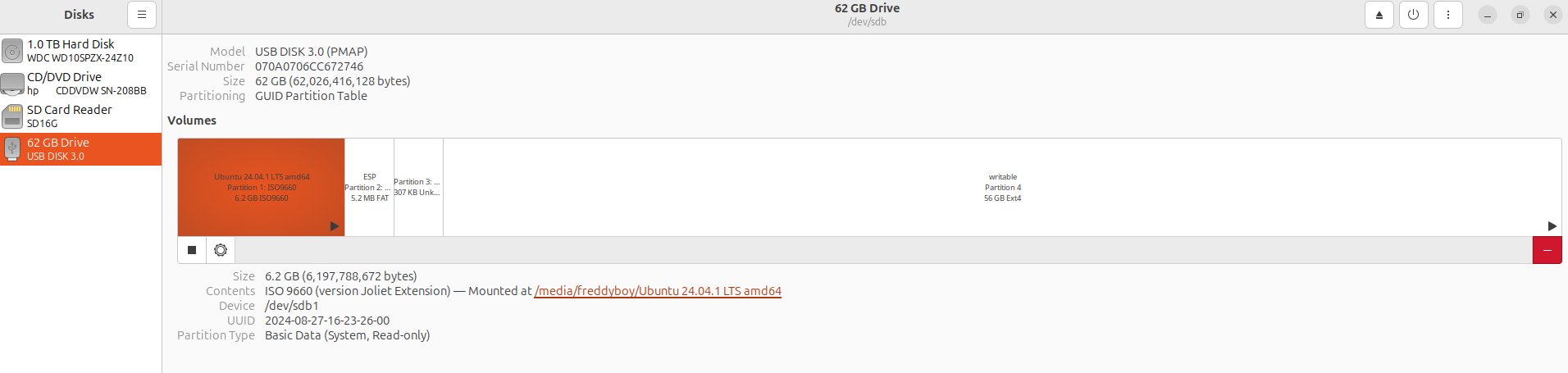
The following is an Ubuntu Install USB stick partition set
lrGzAQ8o