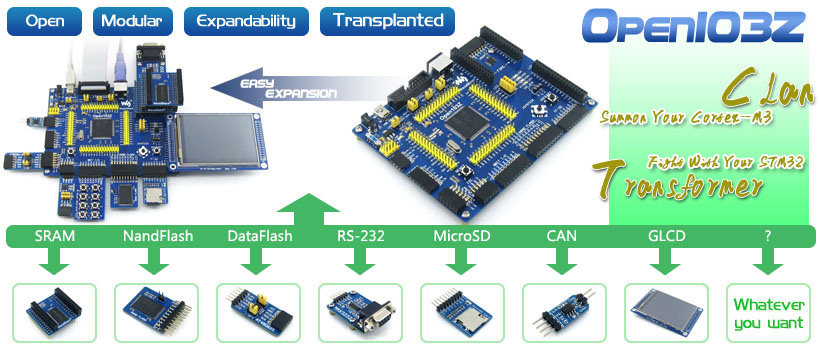
Open103Z ARM development board

The STM32 development board designed for STM32F103Z series features the STM32F103ZET6 MCU and integrates various standard interfaces.  Adding additional peripherals that are required is easy.
Research Links

Purchasing Links


  • STM32F103ZET6:the high performance STM32 MCU in LQFP144 package which features

    • Core: ARM Cortex-M3 32-bit RISC;
    • Operating Frequency: 72MHz, 1.25 DMIPS/MHz
    • I/Os: 112;
    • Operating Voltage: 2-3.6V;
    • Memories: 512K Flash, 64K RAM (the highest specification in STM32F103Z series);
    • Communication Interfaces: 3xSPI, 5xUSART, 2xI2S, 2xI2C, 1xFSMC, 1xLCD, 1xSDIO, 1xUSB, 1xCAN;
    • AD & DA converters: 3xAD (12bit, 1μs, shares 21 channels); 2xDA (12bit);
    • Debugging/Programming: supports JTAG/SWD (serial wire debug) interfaces, supports IAP;
  • 74LVC139: Used for FSMC expansion, makes it possible to connect multi peripherals through FSMC at the same time, such as connecting a LCD and a NAND FLASH;
  • AMS1117-3.3: 3.3V voltage regulator;
  • Power supply switch: 5V DC or USB;
  • Power indicator;
  • LEDs: Convenient for indicating I/O status or program debugging running state;
  • Reset button;
  • User key;
  • Joystick: Convenient for I/O input (five positions);
  • 32.768K crystal oscillator: for internal RTC;
  • 8M crystal oscillator: enables the MCU run at 72M frequency by frequency multiplication;
  • SDIO Interface: connects to the Micro SD Board easily, It is much faster to read/write the Micro SD card via SDIO than via SPI;
  • 8 I/O Interface: easily connects to keypad, motor, etc;
  • CAN Interface: communicates with accessory boards which feature the CAN device conveniently;
  • SPI Interface: easily connects to SPI peripherals such as FLASH (AT45DBxx), SD card, MP3, etc;
  • I2C Interface: easily connects to I2C peripherals such as I/O expander(PCF8574), EEPROM (AT24Cxx), etc;
  • NAND FLASH Interface: easily connects to the NAND FLASH peripherals;
  • LCD Interface: easily connects to the touch screen LCD;
  • ONE-WIRE Interface: easily connects to ONE-WIRE devices (TO-92 package), such as temperature sensor (DS18B20), electronic registration number (DS2401), etc.
  • PS/2 Interface: easily connects to PS/2 keyboard or mouse;
  • USART1 Interface: easily connects to RS232, RS485, USB TO 232;
  • USART2 Interface: easily connects to RS232, RS485, USB TO 232;
  • FSMC Interface: easily connects to FSMC interface, such as NorFlash (S29GL128P), SRAM (IS62WV51216BLL);
  • USB Port: USB communication between board and PC;
  • 5V DC jack;
  • 5V/3.3 V power input/output;
  • MCU pins connector: all the MCU pins are accessible on expansion connectors for further expansion;
  • JTAG/SWD interface: for debugging/programming;
  • Boot Mode Selection: for configuring the BOOT0 and BOOT1 pins;
  • USB Enable Jumper  

    • Short the jumper to enable the PC auto detection while USB connecting 
    • Open the jumper to disable;
  • PS/2 Interface Jumper

    • short the jumper to connect the PS/2 device to default I/Os;
    • Open the jumper to connect the PS/2 device to custom I/Os via DuPont wires;
  • LEDs Jumper

    • Short the jumper to connect the LEDs to default I/Os;
    • Open the jumper to connect the LEDs to custom I/Os via DuPont wires;
  • VBAT Selection Jumper

    • Short the jumper to use system power supply;
    • Open the jumper to connect the VBAT to external power, such as battery;

Installing Kali NetHunter on Nexus 7 Tablet

Making notes here regarding Kali NetHunter installed on a Nexus 7 tablet.  I noticed this was possible when looking on ebay for a Nexus 7 for a car computer installation.

Research Links


YouTube: How To Install Kali On Nexus 7 [2016] High Quality

ARM Laptop Motherboard – IMX53QSB: i.MX53 Quick Start Board

Research Links

The i.MX53 Quick Start Board is a $149 open source development platform. Integrated with an ARM® Cortex™-A8 1 GHz processor and the Freescale MC34708 PMIC, the Quick Start Board includes a display controller, hardware-accelerated graphics, 1080p video decode and 720p encode as well as numerous connectivity options ideally suited for applications such as human machine interface in embedded consumer, industrial and medical markets.

Features

  • Full–size SD/MMC card slot
  • Micro SD card slot
  • 7–pin SATA data connector
  • 10/100BT Ethernet port
  • 2x high–speed USB Host port
  • 1x Micro USB Device port


Loading demo Linux Onto the card

  • IMX53_QSB_UBUNTU_SD_DEMO_IMAGE:    Download DescriptionClose –  File and Instructions to create an SD with an Ubuntu Demo Image like the one provided with the QSB. Supports MCIMX53-START and MCIMX53-START-R.    When I created the boot flash card the process went just as described in the booklet that came with the kit.  The board did not boot up.  Is the board bad?
  • Writing the demo linux image to flash card – Step by step

Features Needed for project

  • SATA for hard drive
  • WiFi 
  • USB
  • Ethernet
  • Audio In / Out
  • Drive a laptop LCD

​

ARM boards

Research Links: LCD Direct Drive