Open Source Software: Timing Editor

I needed to draw a timing diagram for a mixed signal class I took.  I found 

The problem I was solving is shown below in the image.  It's rather tedious to figure out.  You have to remember that once a gate capacitance is charged up it ideally holds that charge until it is connected to again by either Vdd or Ground.
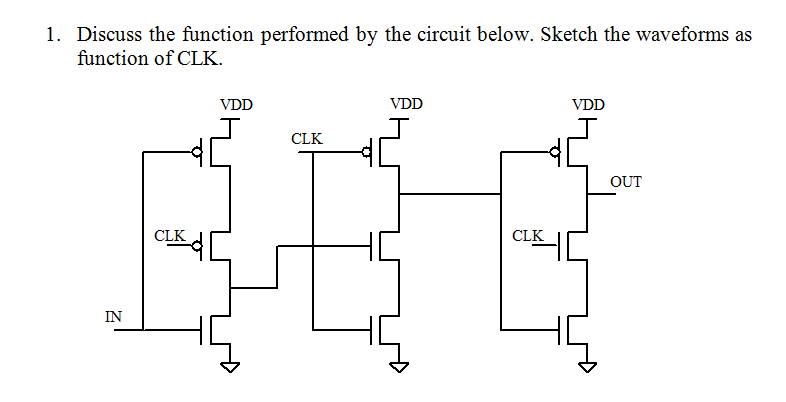
 

The gate turns out to be a falling edge triggered flip flop.  You can see it in the wikipedia:flip flop article that includes this diagram which was found after I did the timing diagram.


Software: ChromeCacheView – easily view chrome cache content

Viewing the chrome cache files can be a pain by the manual cut and paste method.  The files are full of binary representations that make no immediate sense to a human.  You have to copy all and paste into an online tool.  Be careful to not refresh pages of interest when recovering files.  It will wipe out the files if you do.  Better yet there may be a setting that you can turn off to prevent any erasure while you are doing your recovery.

There is a much better solution:

ChromeCacheView runs as an application on your machine and you can view whole webpages and images by just using the appropriate menu function. MUCH BETTER.

Julius: two-pass large vocabulary continuous speech recognition (LVCSR) decoder software

Links

"Julius" is a high-performance, two-pass large vocabulary continuous speech recognition (LVCSR) decoder software for speech-related researchers and developers. Based on word N-gram and context-dependent HMM, it can perform almost real-time decoding on most current PCs in 60k word dictation task. Major search techniques are fully incorporated such as tree lexicon, N-gram factoring, cross-word context dependency handling, enveloped beam search, Gaussian pruning, Gaussian selection, etc. Besides search efficiency, it is also modularized carefully to be independent from model structures, and various HMM types are supported such as shared-state triphones and tied-mixture models, with any number of mixtures, states, or phones. Standard formats are adopted to cope with other free modeling toolkit such as HTK, CMU-Cam SLM toolkit, etc.

Originally done for Japanese.

Here you can get Japanese and English free language/acoustic models.

QUCSEdit stand alone compile errors

Appears to be 2 types of errors 

  • Errors due to class changes going from Qt3 to Qt4 – These could probably be addressed with correct switch to include q3support library that is included with Qt4.  I copied the q3textstream.h to the working directory to get around referencing error.  By not setting this I am forcing all the references not compatible with Qt4 to surface.
  • Errors due to the translation files not being available for access


freemonsandlewould@desi:~/Documents/qucs-edit$ make
g++ -c -pipe -O2 -Wall -W -D_REENTRANT -DQT_NO_DEBUG -DQT_GUI_LIB -DQT_CORE_LIB -DQT_SHARED -I/usr/share/qt4/mkspecs/linux-g++ -I. -I/usr/include/qt4/QtCore -I/usr/include/qt4/QtGui -I/usr/include/qt4 -I. -I. -o main.o main.cpp
main.cpp: In function ‘bool loadSettings()’:
main.cpp:44:14: error: ‘homeDirPath’ is not a member of ‘QDir’
main.cpp:64:8: error: ‘class QFile’ has no member named ‘setName’
main.cpp:64:16: error: ‘homeDirPath’ is not a member of ‘QDir’
main.cpp:73:36: error: ‘class QString’ has no member named ‘stripWhiteSpace’
main.cpp: In function ‘bool saveApplSettings(QucsEdit*)’:
main.cpp:95:14: error: ‘homeDirPath’ is not a member of ‘QDir’
main.cpp:105:43: error: expected ‘;’ before ‘PACKAGE_VERSION’
main.cpp: In function ‘void showOptions()’:
main.cpp:116:55: error: ‘PACKAGE_VERSION’ was not declared in this scope
main.cpp: In function ‘int main(int, char**)’:
main.cpp:150:30: error: ‘BITMAPDIR’ was not declared in this scope
main.cpp:151:28: error: ‘LANGUAGEDIR’ was not declared in this scope
main.cpp:162:12: error: ‘locale’ is not a member of ‘QTextCodec’
main.cpp:172:68: error: cannot convert ‘QString’ to ‘const char*’ for argument ‘2’ to ‘int fprintf(FILE*, const char*, …)’
main.cpp:176:22: error: ‘const class QChar’ has no member named ‘latin1’
main.cpp:182:67: error: cannot convert ‘QString’ to ‘const char*’ for argument ‘2’ to ‘int fprintf(FILE*, const char*, …)’
main.cpp:189:67: error: cannot convert ‘QString’ to ‘const char*’ for argument ‘2’ to ‘int fprintf(FILE*, const char*, …)’
main.cpp:196:5: error: ‘class QApplication’ has no member named ‘setMainWidget’
make: *** [main.o] Error 1

Migration Qt3 to Qt4: They changed the name of class members that APPEAR to do the same thing.  

Modified File: qucsedit

Auxiliary Links

Importing an existing C++ project into NetBeans IDE

Links: – These are not QT based projects.


NetBeans: New Project > C++ project with existing source

  • At this point I encountered this page:  NetBeans with Qt3  I did the project import using the existing SpreadSheet project that I had previously successfully built using command line interface.  It successfully built under NetBeans direction.  It is important that I built successfully previously as Netbeans used all that was in place as was.