Doxygen + GraphVis for documenting software from source code
Usage
If you install in the default location it appears you do not have to tell Doxygen that Graphvis is there.
To run
- Point Doxygen towards the source code folder
- Point towards destination folder – empty premade to hold the documentation results
- I want everything so I check recursive so Doxygen looks in the subfolders
- Check – Use dot tool from the Graphviz package – to get the fancy graphs
Doxygen Links
- Doxygen Manual
- Doxygen Tutorial – with link to see example project docs
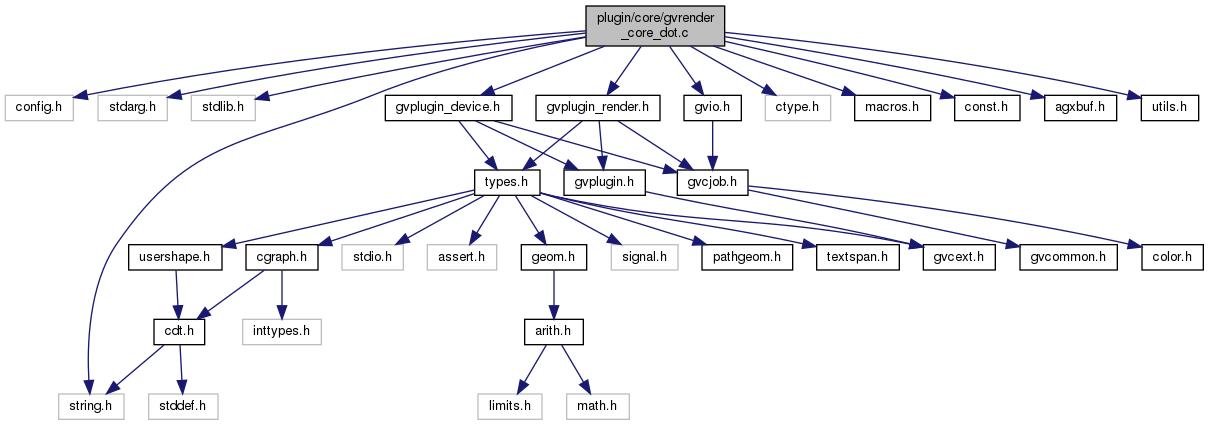
- Doxygen Graphs and Diagrams – Specifying what you want – Example diagrams that result from each config – can be from bottom up or top down.
- Doxygen Comment Tags – allows the coder to control what and how comments are extracted.
Additional links
- Other noncommercial documentation tools
- VBDoxyAddIn
- Doxygen helper script page has vb6 converter scripts
- Greg's source code navigation page – old but has some relevant comments and other tools listed
- WordPress Doxygen example
Graphing Tools to Automate FlowChart Generation Table Of Contents
End TOC
You’re actually a just right webmaster. The website loading speed is amazing. It kind of feels that you’re doing any unique trick. Also, The contents are masterwork. you’ve performed a magnificent process on this matter!