Computing
Media Wiki Domain move with software and database update
Procedure
- create new subdirectory under blog to hold the mediawiki software
- upload mediawiki to #1
- run the mediawiki install by pointing a browser to #1
- during install point to the old database. The install will recognize the database needs updated. Let it do that.
- You will need to regenerate LocalSettings.php. After you download it upload it to #1
- Dial a browser up to #1. Your install should be working now. Remember: it is still using the old database though
- download Image folder from old mediawiki install and upload it to the new install – this is to transfer the photos from the old install
- New database: I want a unique database not mixed with others so on dreamhost I am forced to create a new subdomain.
- Using the new subdomain of #8 create a new database. On Dreamhost tends to look like: mysql.subdomain.yourdomain.com
- make a note of the user associated with new database!
- If you are going Dreamhost domain to dreamhost domain all you need to do is use the new database HostName. The DB username has access to whatever database it has been given regardless of what HostName is used.
- If you are changing to a different host continue as #11 does not apply.
- Ready for transfer of database. Using PhpMyAdmin export your database with no compression. The method of import will use BigDump script if your database is big. And too big is not very big with Dreamhost! If you are going to import using this do not use the Export > Data > Extended Inserts option when you export your existing database.
- Make a directory under your install folder called /dump
- Get BigDump.php here. upload BigDump.php to your /dump directory. The bigdump.php file has instruction on usage in the comments.
- upload your database file to /dump directory
- point a browser at the /dump directory and run bigdump.php.
- Use phpMyAdmin to verify tables were created and filled by bigdump.php.
- delete your old installation and database. Do any necessary cleanup now or you(I) am likely to forget!
Math
Math: Derivation of Matrix Determinant
Which you should recognize as Cramers rule lurking in the bushes.
Now let us take it a little further. Click into the links below to first see the derivation of the determinant of a 3×3 matrix. Then clink into the derivation of the determinant of a 4×4 matrix and higher with recursion.
Derivations
- Derivation of 3×3 determinant – This is used as a basis to develop notation that is useful in the final proof based on the 4×4 derivation
- Matrix-Determinant.lyx – original document
- Derivation of 4×4 determinant and deriving higher order determinants using recursion
- Matrix-Determinant-4×4-and-higher.lyx – original document
Research Links
Music
Music: Warren Zevon: Werewolves of London with Piano Tutorial
This one is more in my key.
I saw a werewolf with a Chinese menu in his hand
Walkin' through the streets of Soho in the rain
He was lookin' for the place called Lee Ho Fooks
Gonna get a big dish of beef chow mein
Aaahoo! Werewolves of London
Aaahoo!
Aaahoo! Werewolves of London
Aaahoo!
Ya hear him howlin' around your kitchen door
Ya better not let him in
Little old lady got mutilated late last night
Werewolves of London again
Aaahoo! Werewolves of London
Aaahoo!
Aaahoo! Werewolves of London
Aaahoo!
He's the hairy, hairy gent, who ran amok in Kent
Lately he's been overheard in Mayfair
You better stay away from him
He'll rip your lungs out Jim
Huh, I'd like to meet his tailor
Aaahoo! Werewolves of London
Aaahoo!
Aaahoo! Werewolves of London
Aaahoo!
Well, I saw Lon Chaney walkin' with the queen
Doin' the werewolves of London
I saw Lon Chaney Jr. walkin' with the queen
Doin' the werewolves of London
I saw a werewolf drinkin' a pina colada at Trader Vic's
And his hair was perfect
Aaahoo! Werewolves of London
Draw blood
Aaahoo! Werewolves of London
The right hand on piano
Left Hand
Computing
Adding Display Resolutions to Ubuntu Linux
I connected my Ubuntu laptop to an external 24 inch monitor. I then tried to set the resolution to a level appropriate for a 24 inch monitor: 1920×1200. However when I looked in the settings the highest resolution was quite low. I had to add additional resolution levels manually.
Research Links
- External Monitor Resolution doesn't go above 1024×768
- How to set the monitor to its native resolution which is not listed in the resolutions list?
- How can I make xrandr customization permanent?
- Setting xrandr changes persistently
- NVIDIA Quadro NVS 160M in the Dell Latitude E6500 – this will update the drivers I think. Rebooting to find out! The correct resolutions did not show up in the config list
- NVIDIA 310.19 Drivers Released How To Install It In Ubuntu 12.10/12.04 Tried this.
- Ubuntu Screen Resolution everything page
I followed the procedures detailed in the linked articles. When I tried 1920×1200 resolution with 60Hz frequency it did not show up in the configuration gui list. It must have been illegal. When I changed to 70Hz it did work. Note that it is important to generate the mode line individually for each resolution/frequency combination. I did a bonehead thing and reused the line for the 1280×1024 for the 1920×1200 mode and of course that did not work.
The changes made are not permanent and upon reboot will be lost.
Adventures
Adventures: Working at the South Pole
I have occasionally thought about working in Antarctica. The following links are to a complete write up of one mans process of getting a job at the Amundsen–Scott South Pole Station.
Story Links
- IceCube Neutrino Observatory – this is what lead me to the story
- Amundsen–Scott South Pole Station
- Jeffery Donenfield – I got my dream job – I assume his dream will change to something new after this
- Frequently Asked Questions about life at the Amundsen-Scott South Pole Station, Antarctica
The Amudsen Scott South Pole Station is indeed at the south pole. It is about 10000 feet above sea level.

This map looks like countries have staked their claim to Antarctica just in case of something valuable there. Everyone will talk international socialist harmony to rule over Antarctica until something like oil is found there. Then all bets will be off.

Computing
Adobe User Information Leak – The Crossword Puzzle
Adobe got hacked and millions of passwords plus password hints were leaked. XKCD made a comic depicting a crossword puzzle based on the leak:
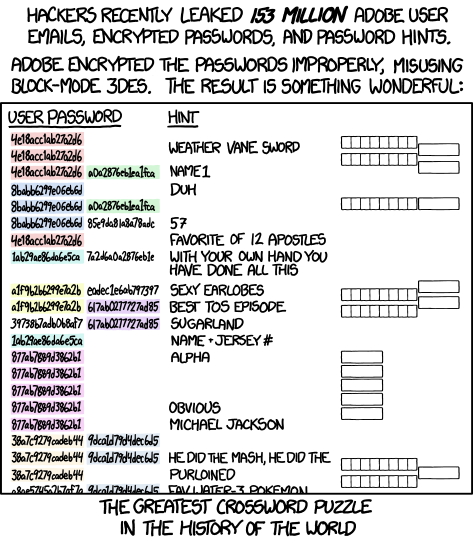
And once done you knew it was only a matter of time before someone made the real thing. You can see that here: Live Adobe CrossWord Puzzle Page
Oops…I better change my password.
Research Links